epilot app
In review by epilot – coming soon to the epilot Marketplace
Dynamic Dropdown
Dynamic Dropdown is an epilot app with a Custom Journey Block: a dropdown field for epilot journeys whose entries are loaded live from your backend or API.
Last updated:

What is Dynamic Dropdown?
Dynamic Dropdown adds a dropdown field to epilot journeys whose entries come from an API. epilot's built-in select fields only have static options. Dynamic Dropdown closes that gap: when a list changes in your backend, the journey shows the current state.
- Status
- In review by epilot – coming soon to the epilot Marketplace
- Type
- epilot app with a Custom Journey Block
- Publisher
- DigitalFreedom Global LLC
- Installation
- From the epilot Marketplace into your epilot organization, once epilot has approved the app
- Entries
- Up to 1000 per field, live from your API
- Price
- €1,290 net per year per epilot organization, updates included, support billed by time spent
Your own API or the included free backend
The apps can query any API that delivers data in the Dynamic apps structure, or you can use the backend that is included for free and then only need to fill the tables.
A free test instance with demo data is available to try the optional epilot-dynamic-backend. In the app settings, set api_host to epilot-test.app.digitalfreedom.co.za and leave secret empty because the test API is public. Base URL: https://epilot-test.app.digitalfreedom.co.za.
Available paths: /api/v1/netzgebiete, /api/v1/tarife, /api/v1/ladeeinrichtungen, /api/v1/zaehlerarten and /api/v1/einspeisung.
If you choose the included backend, you can self host epilot-dynamic-backend for free. JVM images and native images built with GraalVM are available, each for PostgreSQL and Oracle.
In table mode, you populate the lists using SQL and can optionally load demo data into the tables. Demo data is only for table mode. As an advanced option, the included backend can read a database view in the prescribed structure in view mode. The guide and images are available in the public GitHub folder.
Who is Dynamic Dropdown for?
Dynamic Dropdown is for municipal utilities, grid operators and energy suppliers that use journeys in epilot and want to show option lists from their own systems.
- The options change regularly, for example tariffs per region.
- The data already lives in your backend or is reachable through an API.
- Besides the display text, an entry needs a business value, for example a tariff code that epilot processes further.
How does Dynamic Dropdown work?
The block loads the entries in the background as soon as the journey shows it, and refreshes them when the list is opened.
- Loading: entries are preloaded when the block renders. When the dropdown is opened, the block reloads the list, at most every 5 seconds.
- Search: typing in the field filters the list. It shows every entry whose value or label contains the typed fragment, ignoring case.
- Size: up to 1000 entries. The list scrolls.
- Entries: each entry has a key (stable identifier), a label (display text), a value (business value) and an optional info with a description.
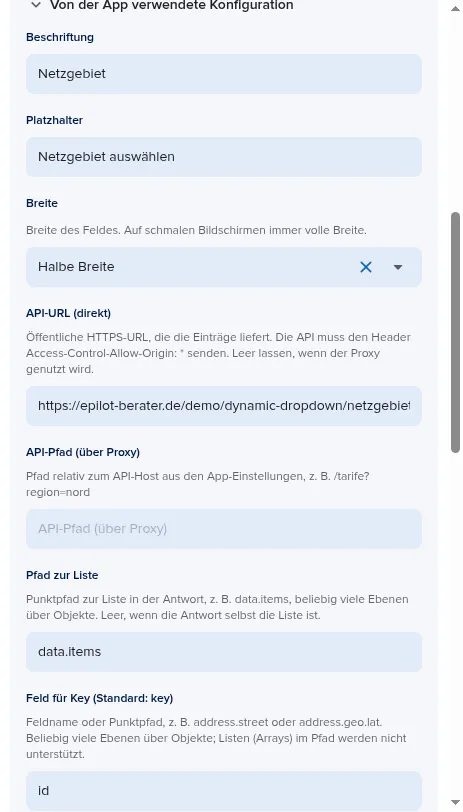
- Info: entries with an info show an info icon in the list. Hovering it opens a bubble with the details. After selection, an info icon next to the field shows the info of the selected entry on hover, focus or tap.
- Design: the field follows the journey theme automatically, meaning colors, font and corner radius, through epilot's Concorde UI.
- Width: configurable per block in the Journey Builder, full width, three quarters, half width or one third. On narrow screens the field always takes the full width.
- Option no longer available: if the API no longer delivers a previously selected entry, the field shows the notice "Die gewählte Option ist nicht mehr verfügbar." (the selected option is no longer available).
What it looks like in epilot
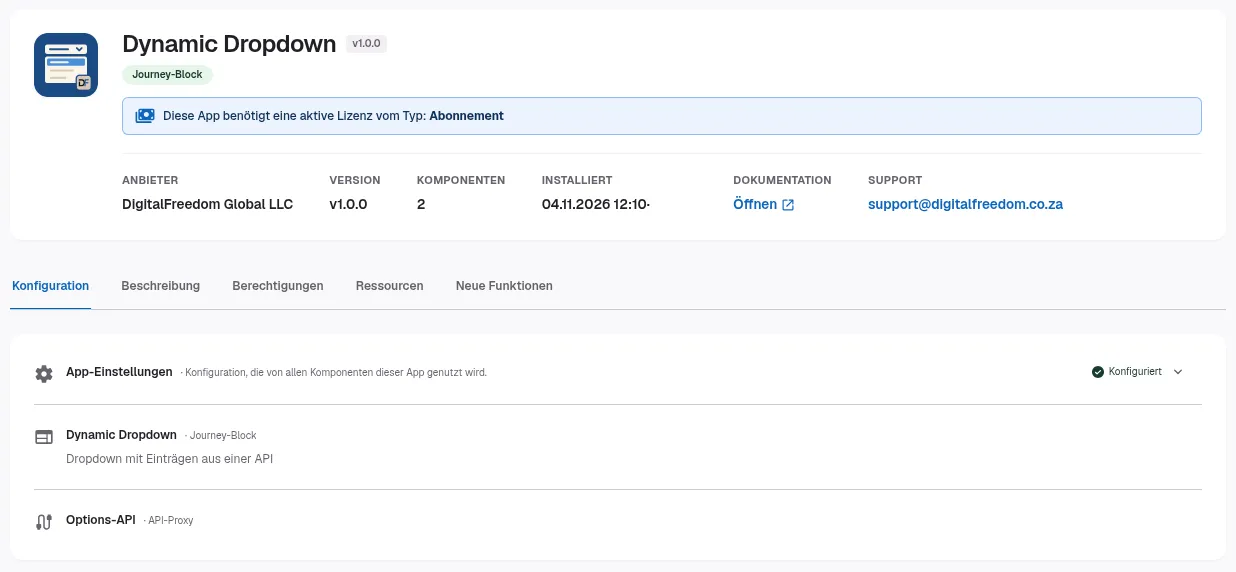
The images come from our epilot test organization and the public demo; the epilot interface is shown in German. A click opens the image in full size.
Try the demo
A public demo journey lets you try Dynamic Dropdown without signing in. Five dropdown fields load their entries live from epilot-dynamic-backend. The table shows the demo data.
| Field | Data source | Demo data |
|---|---|---|
| Netzgebiet (grid area) | epilot-dynamic-backend | Electricity grid operators from the Marktstammdatenregister |
| Tarif (tariff) | epilot-dynamic-backend | Example tariffs |
| Ladeeinrichtung (charging equipment) | epilot-dynamic-backend | Wallboxes and charging stations |
| Zählerart (meter type) | epilot-dynamic-backend | Example meter types |
| Einspeisung (PV feed-in) | epilot-dynamic-backend | Example feed-in options |
- Grid area: epilot-dynamic-backend supplies the demo list of electricity grid operators from the Bundesnetzagentur's market master data register (Marktstammdatenregister, Datenlizenz Deutschland Namensnennung 2.0). Type a name or town to try the search.
- Tariff, charging equipment, meter type and feed-in: made-up example lists, including wallboxes and charging stations for registering charging equipment.
- Info icon: hover over the icon next to an entry, or next to the field after a selection.
The demo runs in an epilot sandbox. Submitting works; entries are stored in that sandbox. Please do not enter real personal data.
How do you set up Dynamic Dropdown?
Setup takes three steps: install the app, configure the proxy if needed, add the block to the journey.
- Install the Dynamic Dropdown app from the epilot Marketplace into your epilot organization. This is possible once epilot has approved the app; it is currently in review by epilot.
- Proxy mode only: enter the API host (api_host) and the API token (secret) in the app settings. In epilot you find them under Konfiguration, Apps, Installierte Apps, Dynamic Dropdown, App-Einstellungen (configuration, apps, installed apps, app settings).
- Open the journey in the Journey Builder, add the block "Dynamic Dropdown" from "Installierte Apps" (installed apps) and fill in the arguments, including the data source: api_url or api_path.
Which settings does the block have?
The block has three arguments for display, two for the data source and five for the API response format.
| Argument | Label in the Journey Builder | Meaning |
|---|---|---|
field_label | Label | Label of the dropdown field |
placeholder | Placeholder | Text in the field while nothing is selected |
width | Width | Full width, three quarters, half width or one third. Always full width on narrow screens. |
api_url | API URL (direct) | Public HTTPS URL returning the entries. Leave empty when using the proxy. |
api_path | API path (via proxy) | Path relative to the API host from the app settings, e.g. /tariffs?region=north |
items_path | Path to list | Dot path to the list in the response, e.g. data.items. Empty if the response is the list. |
key_field | Key field (default: key) | Field name of the key in the response |
label_field | Label field (default: label) | Field name of the label |
value_field | Value field (default: value) | Field name of the value |
info_field | Info field (default: info) | Field name of the info |
Where does the block load the entries from?
The block loads the entries either directly from a public API or through epilot's API proxy when the API requires a key.
| Direct | Proxy | |
|---|---|---|
| Block argument | api_url | api_path |
| App settings | none | api_host and secret |
| Suited for | Public HTTPS APIs without credentials | APIs that require a bearer token |
| Requirement | The API sends Access-Control-Allow-Origin: * | Host and token are stored in the app settings |
Direct: epilot runs the block in a sandboxed iframe whose origin is null. The API must therefore send the header Access-Control-Allow-Origin: *. Allowing specific domains is not enough.
Proxy: api_host holds the host and an optional base path, without https://, for example api.example.com/v1. The proxy sends the secret server-side as a bearer token. Credentials never reach the browser.
The requested address is https:// plus api_host plus api_path. api.example.com/v1 and /tarife?region=nord become https://api.example.com/v1/tarife?region=nord.
The proxy supports a bearer token. An API key in a custom header, basic auth or OAuth 2.0 are currently not supported.
api_host and secret apply to all Dynamic Dropdown blocks of one epilot organization. Different lists come from different paths on the same host.
After saving, the secret can no longer be read. epilot only shows that it is set and when it was last changed. It can be replaced at any time.
Which format must the API return?
By default the block expects a JSON array in which every entry has the fields key, label, value and optionally info.
[
  {
    "key": "basic",
    "label": "Basis-Tarif",
    "value": "TARIF_BASIC_2026",
    "info": "12 Monate Laufzeit"
  }
]- If the list sits deeper in the response, enter its dot path in the items_path argument, for example data.items.
- If the fields have other names, map them with key_field, label_field, value_field and info_field.
- If a field sits deeper in the entry, use a dot path, for example address.street or address.geo.lat. This works across any number of levels as long as each level is an object. Lists in the path, such as tags.0.code, are not supported.
- Numbers are converted to text.
- Entries without key, label or value are skipped.
- For duplicate keys, the first entry wins.
Example of a different response shape. You map it with items_path = data.items, key_field = id, label_field = name and value_field = code:
{
  "data": {
    "items": [
      {
        "id": "basic",
        "name": "Basis-Tarif",
        "code": "TARIF_BASIC_2026"
      }
    ]
  }
}
What data does the block store?
The block stores the selected entry as JSON with the fields key, label, value and info.
{
  "key": "basic",
  "label": "Basis-Tarif",
  "value": "TARIF_BASIC_2026",
  "info": "12 Monate Laufzeit"
}
Through the component mapping the four fields are available as text fields in epilot's entity mapping. That way you carry the selection into your entities like any other journey field.
What should you consider for security?
Use a read-only API key in proxy mode.
- Anyone who opens the journey can request any path on the configured host through the proxy, not only the one set in the block. Use a dedicated host or key that only serves the option lists and can only read.
- The secret stays server-side. The proxy sends it as a bearer token; the browser never receives it.
- In direct mode the API is publicly reachable, because it sends Access-Control-Allow-Origin: *. Only serve data there that anyone may see.
- The stored value comes from the browser and can be altered. Validate it server-side before a decision with consequences relies on it, for example a tariff or an approval.
What if the field does not work as expected?
The block shows a message below the field. The exact cause is logged to the browser console with the prefix [dynamic-dropdown].
| Message in the field | Cause | Fix |
|---|---|---|
| This field is not configured correctly. | Neither api_url nor api_path is set, both are set, api_url is not an https address, or api_path does not start with /. | Enter exactly one data source in the Journey Builder: api_url with https:// or api_path with a leading /. |
| The options could not be loaded. | The API is unreachable, returns an error status, does not answer within 10 seconds, or returns no list at items_path. In direct mode the header Access-Control-Allow-Origin: * is often missing. | Open the URL in the browser and check the response, adjust items_path to it. In direct mode allow CORS or use proxy mode. In proxy mode check api_host and secret in the app settings. |
| No options available. | The list is empty, or no entry has a key, label and value because the *_field arguments do not match the response. | Match key_field, label_field and value_field to the field names in the response, using dot paths for nested fields. |
| The selected option is no longer available. | The API no longer returns the previously selected entry. | Select again. If the entry is meant to be gone, nothing to do; otherwise check the data in the API. |
Further reading
Frequently asked questions about Dynamic Dropdown
- Why is epilot's built-in select field not enough?
- epilot's built-in select fields have static options stored in the journey. Dynamic Dropdown loads the options live from your API, so the journey shows the current state.
- Why does the list not load in direct mode?
- Check the CORS header first. epilot runs the block in an iframe with the origin null, so the API must send Access-Control-Allow-Origin: *. Allowing specific domains is not enough. Alternatively use proxy mode.
- Can I connect an API that needs credentials?
- Yes, through proxy mode. You store api_host and secret in the app settings. The proxy sends the secret server-side as a bearer token. In the block you only enter the relative path as api_path.
- How many entries can the list have?
- Up to 1000 entries. The list scrolls.
- How current are the entries?
- The block loads the entries as soon as it is shown and reloads them when the dropdown is opened, at most every 5 seconds.
- What happens if a selected option disappears?
- If the API no longer delivers a previously selected entry, the field shows the notice "Die gewählte Option ist nicht mehr verfügbar." (the selected option is no longer available).
- Does the field match my journey design?
- Yes. Dynamic Dropdown takes colors, font and corner radius from the journey theme automatically.
- Can I already install Dynamic Dropdown from the epilot Marketplace?
- Not yet. The app is in review by epilot and will be in the epilot Marketplace once approved. You can already try the demo journey.
- How much does Dynamic Dropdown cost?
- Dynamic Dropdown costs €1,290 net per year per epilot organization. Updates are included, support is billed by time spent.
Dynamic Dropdown for your journeys?
In a free 30-minute intro call on Microsoft Teams we clarify which lists from your systems belong in your journeys. Dynamic Dropdown costs €1,290 net per year per epilot organization. The app is in review by epilot and coming soon to the epilot Marketplace.