epilot app
In review by epilot – coming soon to the epilot Marketplace
MaStR Check
MaStR Check is an epilot app with a Custom Journey Block. The customer enters the MaStR number of their PV system, battery storage, CHP or another unit. The block validates the check digit, looks the unit up live in the Marktstammdatenregister and takes over the public data into the journey. No retyping, fewer follow-up questions.
Last updated:
What is MaStR Check?
When a unit is registered, commissioned or changed, grid operators and utilities ask for its data: capacity, storage size, commissioning date, feed-in type, EEG key. Much of this is already in the Marktstammdatenregister (MaStR), the German market master data register of the Bundesnetzagentur, because operators have to register their units there within one month of commissioning.
MaStR Check brings this data into the journey. The customer only enters the MaStR number, the block shows the data for review and stores it as separate fields for entity mapping. Optionally it checks whether the unit is registered with your own grid and whether the grid operator check is complete.
- Status
- In review by epilot – coming soon to the epilot Marketplace
- Type
- epilot app with one custom journey block
- Provider
- DigitalFreedom Global LLC
- Installation
- From the epilot Marketplace into your epilot organization, once epilot has approved the app
- Units
- Power generation (SEE), battery storage (SSE), EEG installations (EEG), CHP installations (KWK), power consumption (SVE), gas generation (GEE), gas consumption (GVE)
- Data source
- Public unit overview of the Marktstammdatenregister, live, no key of your own
- Price
- €1,990 net per year per epilot organization, updates included, support billed by time spent
Who is MaStR Check for?
MaStR Check is for grid operators, municipal utilities and energy suppliers that ask for data on generation units, storage or large consumers in epilot journeys.
- Registration and commissioning of PV systems, battery storage and CHP units that are already registered.
- Capacity changes, extensions and changes of operator where the existing unit data should be shown.
- Grid operators who want to see whether a unit is registered with their grid and whether their check in the register is complete.
- Sales and direct marketing teams that need the EEG key and commissioning date for offers.
How does MaStR Check work?
The customer enters the MaStR number and leaves the field, presses Enter or clicks “Check”.
- Input: spaces are removed and lowercase letters converted to uppercase. “kwk 9839 0082 2036” becomes KWK983900822036.
- Check digit: the block validates structure and check digit according to the register's numbering concept before any request. Typos show up at once.
- Lookup: the block searches the unit in the register's public unit overview through the epilot API Proxy. A lookup usually takes one to six seconds.
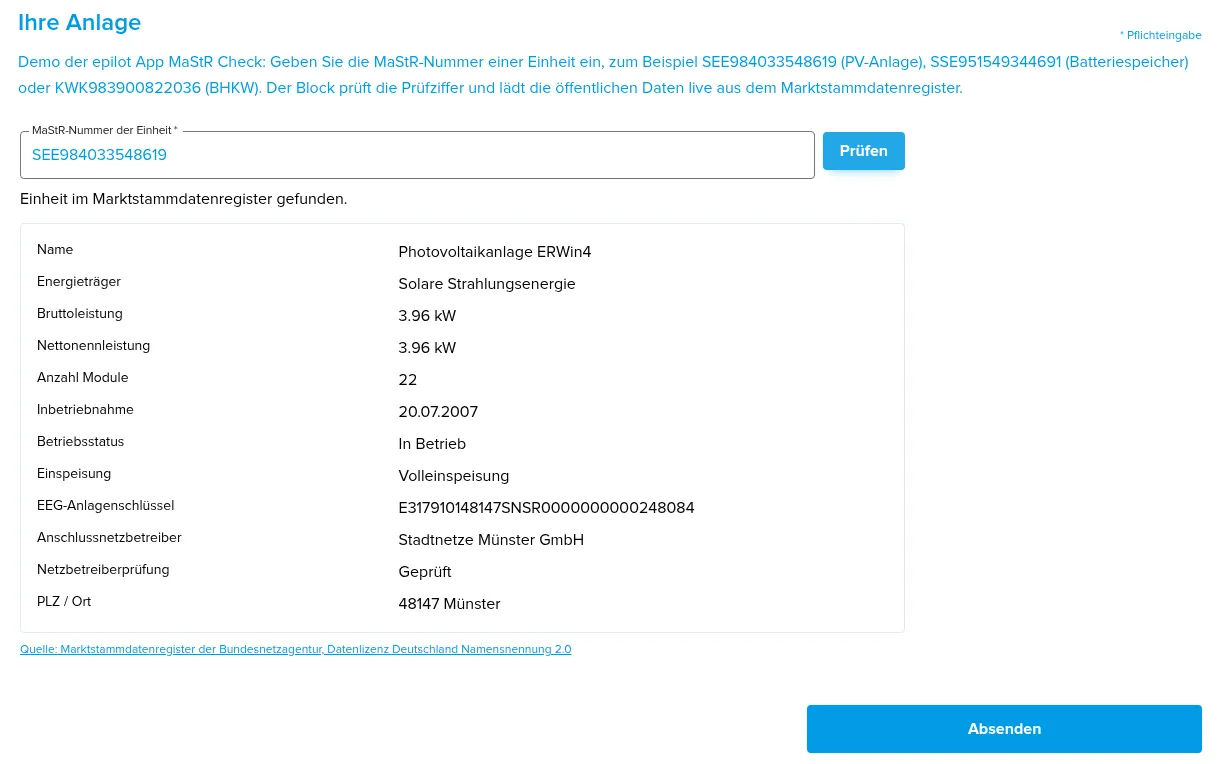
- Display: a card shows name, energy source, gross and net capacity, storage capacity, number of modules, commissioning date, operating status, feed-in, EEG key, connecting grid operator, grid operator check, postcode and city, each only when the register has a value. Below it the source with a link to the public detail page.
- Grid check: if the MaStR numbers of your own grid operators are set, the block reports whether the unit belongs to one of them. Either as a warning only or so that the data is not taken over.
- Required field: only a found and accepted unit is stored, so the journey's required check works.
- Design: field and button follow the journey theme automatically through epilot's Concorde UI.
What it looks like in epilot
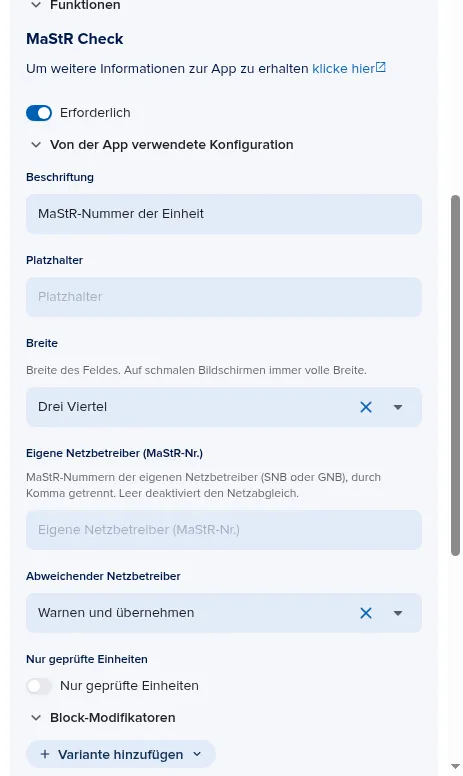
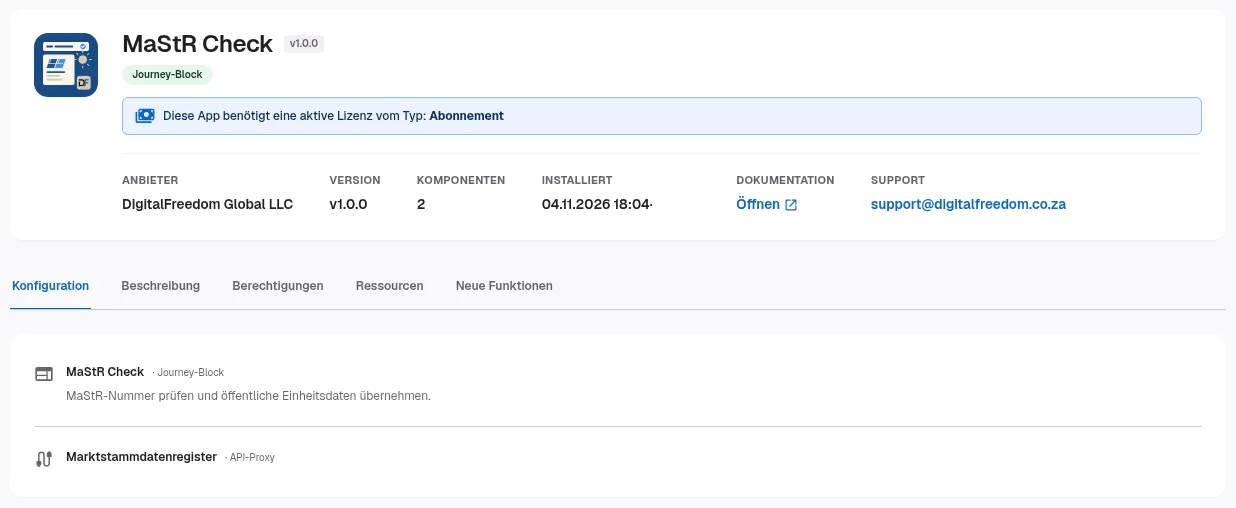
The images come from our epilot test organization and the public demo; the epilot interface is shown in German. A click opens the image in full size.
Try the demo
A public demo journey lets you try MaStR Check without signing in. The data comes live from the Marktstammdatenregister. These public units are good for testing:
| Unit | MaStR number | Filled fields (selection) |
|---|---|---|
| PV system, 3.96 kW | SEE984033548619 | gross_kwmodule_counteeg_key |
| Battery storage, 6.5 kWh | SSE951549344691 | storage_kwhfeed_ineeg_mastr_nr |
| CHP, natural gas, 5.5 kW | KWK983900822036 | kwk_mastr_nrenergy_source |
- SEE984033548618 shows the wrong check digit message, SEE900000000003 a valid number without a unit in the register.
- The demo has no own grid operator set, so the grid check is off.
The demo runs in an epilot sandbox. Submitting works, entries are stored in that sandbox. Do not enter your own personal data.
How do you set up MaStR Check?
Setup takes two steps. No app settings or credentials are needed.
- Install the MaStR Check app from the epilot Marketplace into your epilot organization. This is possible once epilot has approved the app; it is currently in review by epilot.
- Open the journey in the Journey Builder, add the “MaStR Check” block under “Installed apps”, make it required if needed and fill in the arguments. Then map the fields in the entity mapping, for example gross_kw to the capacity of your unit entity.
Which settings does the block have?
All arguments are optional.
| Argument | Label in the Journey Builder | Meaning |
|---|---|---|
label | Beschriftung (Label) | Field label. Default: MaStR-Nummer der Einheit |
placeholder | Platzhalter (Placeholder) | Text in the empty field. Default: z. B. SEE912345678901 |
width | Breite (Width) | Full width, three quarters, half or one third. Always full width on narrow screens. |
own_operators | Eigene Netzbetreiber (Own grid operators) | MaStR numbers of your own power or gas grid operators (SNB… or GNB…), comma separated. Empty turns the grid check off. |
operator_mismatch | Abweichender Netzbetreiber (Different grid operator) | Warn and save (default) or block saving when the unit belongs to none of your grid operators. |
require_checked | Nur geprüfte Einheiten (Verified units only) | Switch. On: only units with grid operator check “Geprüft” are taken over. |
Where does the data come from?
The Marktstammdatenregister of the Bundesnetzagentur offers its public data in three ways. MaStR Check uses the public unit overview.
| Public unit overview | Official web service | |
|---|---|---|
| Access | Without signing in, as on the register's website | Own user account with a web service key |
| Limits | None published | 100,000 calls per day, unlimited for grid operators |
| Data | Public data of all units | Public data, for grid operators also the units in their own grid and the grid operator check |
| In MaStR Check | Used, through the epilot API Proxy | Not used |
The third way is the daily full export as an XML file of more than 3 GB. It is not suitable for a lookup during the journey.
The public unit overview is the data source of the register's website, not a documented programming interface. If the register changes it, we adapt the app. This is included in the updates.
For private individuals the register masks name, street and house number. The block then shows for example “natürliche Person (ABR…)” as operator. Postcode, city and all technical data are visible.
The data is licensed under Datenlizenz Deutschland Namensnennung 2.0. The block names the source under every result.
What does the register return?
The register returns up to 119 fields per unit. A shortened excerpt of the response for the demo PV system:
{
  "Data": [
    {
      "Id": 1796071,
      "MaStRNummer": "SEE984033548619",
      "EinheitName": "Photovoltaikanlage ERWin4",
      "EnergietraegerName": "Solare Strahlungsenergie",
      "Bruttoleistung": 3.96,
      "Nettonennleistung": 3.96,
      "AnzahlSolarModule": 22,
      "InbetriebnahmeDatum": "/Date(1184889600000)/",
      "BetriebsStatusName": "In Betrieb",
      "VollTeilEinspeisungBezeichnung": "Volleinspeisung",
      "EegAnlagenschluessel": "E317910148147SNSR0000000000248084",
      "NetzbetreiberMaStRNummer": "<a href=\"/MaStR/Akteur/Marktakteur/Detail/1000601\">SNB980883363112</a>",
      "NetzbetreiberNamen": "Stadtnetze Münster GmbH (SNB980883363112)",
      "IsNBPruefungAbgeschlossen": 2954,
      "Plz": "48147",
      "Ort": "Münster"
    }
  ],
  "Total": 1,
  "Errors": null
}- Dates in the /Date(…)/ format are converted to an ISO date, for example 2007-07-20.
- The register returns grid operator numbers with an HTML link. The block reads only the numbers and never renders HTML.
- The grid operator check comes as a code: 2954 Geprüft (verified), 2955 In Prüfung (in review), 3075 Nicht vorgesehen (not intended).
- For gas units the block takes the generation capacity or maximum gas offtake as capacity if the register provides it.
This is how the block queries the register through the API Proxy. The filter column depends on the prefix, for SSE for example “MaStR-Nr. der Speichereinheit”:
{
  "proxy": "mastr",
  "path": "/Einheit/EinheitJson/GetErweiterteOeffentlicheEinheitStromerzeugung",
  "params": {
    "page": "1",
    "pageSize": "2",
    "sort": "",
    "group": "",
    "filter": "MaStR-Nr. der Einheit~eq~'SEE984033548619'"
  }
}
What data does the block store?
It stores JSON with separate fields, as the demo journey would have stored it for the PV system on 4 November 2026 with an own grid operator set:
{
  "mastr_nr": "SEE984033548619",
  "unit_type": "SEE",
  "name": "Photovoltaikanlage ERWin4",
  "energy_source": "Solare Strahlungsenergie",
  "gross_kw": 3.96,
  "net_kw": 3.96,
  "module_count": 22,
  "commissioning_date": "2007-07-20",
  "operating_status": "In Betrieb",
  "feed_in": "Volleinspeisung",
  "eeg_key": "E317910148147SNSR0000000000248084",
  "eeg_mastr_nr": "EEG920083771065",
  "kwk_mastr_nr": "",
  "storage_mastr_nr": "",
  "location_mastr_nr": "SEL948991715391",
  "voltage_level": "Niederspannung (= Hausanschluss/Haushaltsstrom)",
  "operator_name": "Stadtnetze Münster GmbH",
  "operator_mastr_nr": "SNB980883363112",
  "operator_check": "Geprüft",
  "operator_matches": true,
  "postcode": "48147",
  "city": "Münster",
  "operator_party_mastr_nr": "ABR949444220202",
  "register_url": "https://www.marktstammdatenregister.de/MaStR/Einheit/Detail/IndexOeffentlich/1796071"
}
Every field is available on its own in the entity mapping. gross_kw, net_kw, storage_kwh and module_count are numbers and missing when the register has no value. commissioning_date is a date, operator_matches a boolean that is only present when own grid operators are set. Several grid operator numbers are joined with a semicolon and a space. register_url points to the unit's public detail page.
What about security and data protection?
MaStR Check reads public data only and needs no credentials.
- The target of the epilot API Proxy is fixed to the Marktstammdatenregister. The block only queries the four unit overviews there.
- A request is only sent when structure and check digit are valid. The number goes to the register as a filter value, not as part of the path.
- HTML from register fields is never rendered, only text.
- A damaged or unexpected response is not taken over, the block then reports that the register is unavailable.
- The stored data comes from the browser and can be altered. If a decision with consequences relies on it, for example an automatic approval because of „Geprüft“ (checked), look the unit up again in the register server-side.
What if the check does not work as expected?
The block shows a message below the field. In English journeys the messages are in English.
| Message | Cause | Fix |
|---|---|---|
| The check digit is incorrect. Please check the number. | At least one digit is wrong or swapped. | Compare the number with the registration confirmation. |
| Please enter a MaStR number with three letters, a 9 and eleven further digits. | The input does not have the format of a MaStR number. | Enter the full number, for example SEE912345678901. |
| This number does not belong to a supported unit. | The number is valid but belongs for example to a market actor (ABR, SNB) or a location (SEL). | Enter the unit number, it starts with SEE, SSE, EEG, KWK, SVE, GEE or GVE. |
| No unit with this number was found in the Marktstammdatenregister. | The unit is not or not yet publicly registered. | Check the registration in the Marktstammdatenregister. |
| The Marktstammdatenregister is currently unavailable. | The register does not answer within 10 seconds or returns an error. | Check again later. |
| The unit does not belong to one of your grid operators. | The connecting grid operator in the register is not listed in own_operators. | Check the numbers in own_operators, request a correction if the register assignment is wrong. |
Further reading
Frequently asked questions about MaStR Check
- Do I need access to the Marktstammdatenregister?
- No. MaStR Check uses the register's public unit overview. You need neither a user account nor a web service key.
- Which numbers can the block check?
- Numbers of units and installations: SEE, SSE, EEG, KWK, SVE, GEE and GVE. Numbers of market actors such as ABR or SNB and of locations such as SEL are only checked for their check digit; the block reports that they do not belong to a supported unit.
- How current is the data?
- The block queries the register live on every check. It shows the same state the register's website shows at that moment.
- What happens if the register is unavailable?
- The block reports that the register is currently unavailable and stores nothing. If the block is required, the customer can only submit after a successful check.
- Does the customer see other people's personal data?
- No. For private individuals the register masks name, street and house number. The block only shows what the register shows publicly anyway.
- Can I already install MaStR Check from the epilot Marketplace?
- Not yet. The app is in review by epilot and will be in the epilot Marketplace once approved. You can already try the demo journey.
- What does MaStR Check cost?
- MaStR Check costs €1,990 net per year per epilot organization. Updates are included, also adjustments when the register changes its overview. Support is billed by time spent.
MaStR Check for your journeys?
In a free 30-minute introductory call on Microsoft Teams we clarify which unit data your journeys should take over from the Marktstammdatenregister. MaStR Check costs €1,990 net per year per epilot organization. The app is in review by epilot and coming soon to the epilot Marketplace.