epilot app
Coming soon
Make Connect
Make Connect connects epilot to the automation platform Make. The paid epilot app sends events to Make in real time and starts Make scenarios straight from epilot workflows. The free Make app “epilot” brings the modules Make uses to read and write data in epilot. On request, Make runs in EU data centres (AWS Ireland, Germany for enterprise customers), with a data processing agreement under Art. 28 GDPR. Both parts are in development and testing and not available yet.
Last updated:
What is Make Connect?
Make is a platform for building processes between different systems as scenarios, without writing your own code. Make Connect turns epilot into a full building block there: Make reacts immediately to events in epilot, and epilot workflows can start a Make scenario and wait for its result.
The offer has two parts. The epilot app Make Connect is installed in your epilot organization and provides real-time events and the workflow action. The Make app “epilot” is used in Make and provides the modules scenarios use to read and write data in epilot.
- Status
- Coming soon. In development and testing, not installable yet
- epilot app
- Make Connect, with the workflow action “Make-Szenario starten” (start Make scenario) and a setup page
- Make app
- “epilot”, free, with 23 modules and scenario templates
- Hosting at Make
- On request in EU data centres: AWS Ireland, Germany for enterprise customers. Data processing agreement under Art. 28 GDPR. Details under “Data protection with Make”.
- Provider
- DigitalFreedom Global LLC
- Price
- Make Connect €499 net per year per epilot organization, as a subscription via the epilot Marketplace. The Make app is free.
What is Make Connect for?
Make Connect is for municipal utilities, energy suppliers and grid operators who want to connect epilot to other systems without building a separate interface for every connection. The scenario templates show typical processes:
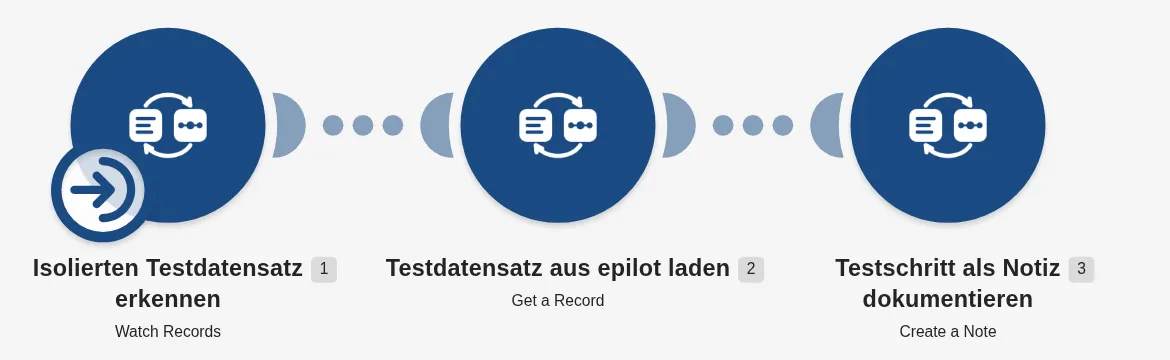
- Grid connection request: a new opportunity is detected, loaded and gets a note. With Make Connect this happens immediately through a real-time event.
- Supplier switch: a changed contract is detected and loaded for the comparison with the target system.
- Meter reading photo: a new file with the tag zaehlerstand is downloaded. You then connect, for example, a filing step or an evaluation.
- Price change: a changed price is detected and loaded.
- Instalment: a changed contract gets the note „Übergabe ausstehend“ (handover pending). You then connect ERP, a spreadsheet or email.
- Customer portal lead, as a draft: an incoming request creates a contact, an opportunity, a relation and a note. This needs Make Connect.
- Workflow with feedback: an epilot workflow starts a scenario, Make writes the result back, and the workflow continues with its next step.
What does Make Connect include?
The epilot app and the Make app work together. The Make app can also be used on its own.
- epilot app Make Connect: the page “Make Connect” in the epilot navigation with instructions and a test ping, the workflow action “Make-Szenario starten”, real-time events to Make through epilot webhooks and the feedback to the workflow through “Resume a Flow”.
- EU hosting at Make: with the data zone EU1, Make processes your scenarios in EU data centres (AWS Ireland, Germany for enterprise customers). Make provides a data processing agreement under Art. 28 GDPR.
- Records: create, get, update, create or update, delete and search, for every record type of your organization. Fields come live from your epilot schemas, including custom attributes.
- Triggers: detect new or changed records at fixed intervals (Watch Records) and receive real-time events from Make Connect (Watch Events).
- Relations, files, notes and submissions: list and add relations, upload and download files, create notes, create submissions.
- Messages and processes: send, reply to and search emails, start workflows, complete tasks, start automations, search products and prices.
- Free API call: Make an API Call reaches further epilot APIs, limited to services under sls.epilot.io.
- Scenario templates for energy suppliers and grid operators, described under the use cases.
What it looks like in Make and epilot
The images come from our test environment. A click opens the image in full size.

How do you set up Make Connect?
The guide describes the setup as it will work after the release. Steps that are still being tested are marked as such. The epilot interface is in German; English translations are given in brackets.
Technical reference of the Make app “epilot”: modules, connection, webhook and limits
1. Open an account with Make
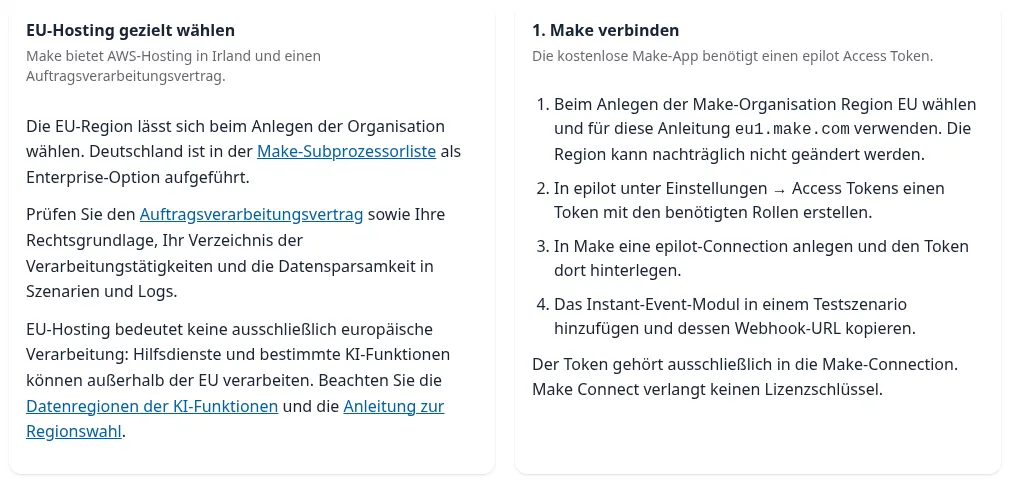
- An account with Make. Choose the data zone EU1 (eu1.make.com) for your Make organization; for it, Make states processing in the EU. You use the Make app “epilot” in the Make organization where your scenarios run.
- An epilot organization and a user who may install apps, create access tokens and edit workflows.
- For real-time events and the workflow action, also the epilot app Make Connect. Without it, Make polls new and changed records at fixed intervals.
Sign up through this link and get your first month of Make Pro with 10,000 operations free.*
*Advertising link (affiliate link): if you sign up through this link and take out a paid Make subscription, DigitalFreedom receives a commission. There is no extra cost for you.
2. Enable the epilot app in Make
- The Make app “epilot” is a private app. It is not listed in the public Make catalogue; you enable it through an invitation link.
- Sign in to your own Make account first, then open the invitation link and confirm the invitation for the Make organization where your scenarios run.
- The app “epilot” then appears when you add a module to your scenarios.
You need to be signed in to your own Make account, where you confirm the invitation.
3. Install Make Connect in epilot
- As soon as Make Connect is available in the epilot Marketplace, install it there in your organization.
- The app requests two permissions: webhook:create for the test ping on the setup page and automation:view, so the workflow action can read its own running execution and determine the callback.
- After the installation, the page “Make Connect” appears in the epilot navigation. It summarizes the setup and contains the test ping.
4. Create an access token and connect Make
- In epilot, create a token under „Einstellungen“ (settings) in the section „Access Tokens“. Give it a role that may read and write exactly the data your scenarios need. A token is valid for up to 365 days or until it is revoked.
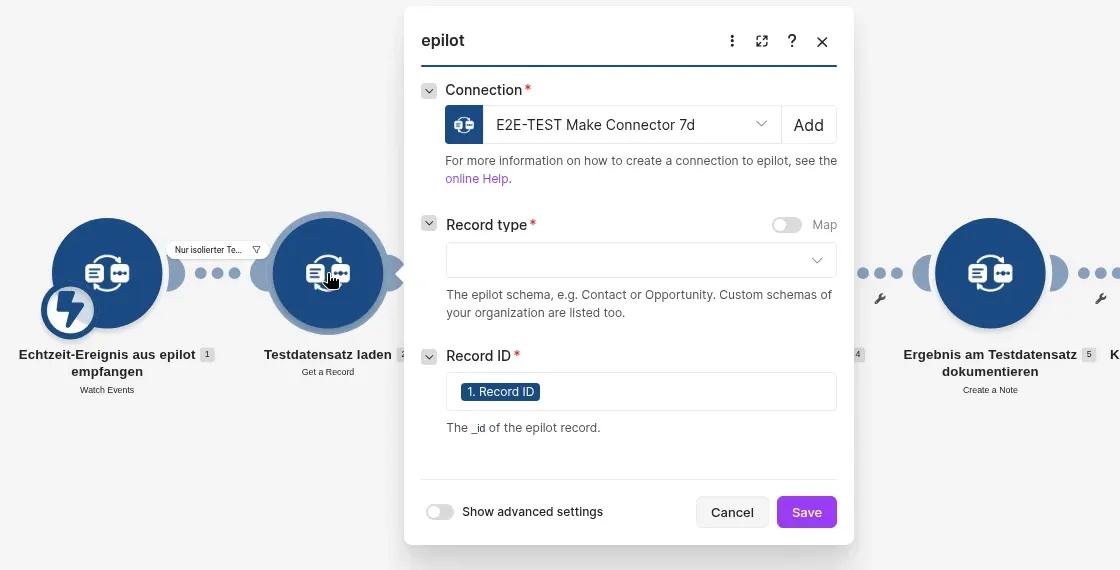
- In Make, add a module of the app “epilot” to a scenario, choose “Add connection” and paste the token. Make checks it immediately by querying the record schemas.
- The modules then offer your record types and fields for selection, including custom attributes of your organization.
- The token belongs only in the Make connection. Make Connect needs neither this token nor a licence key.
5. Set up real-time events
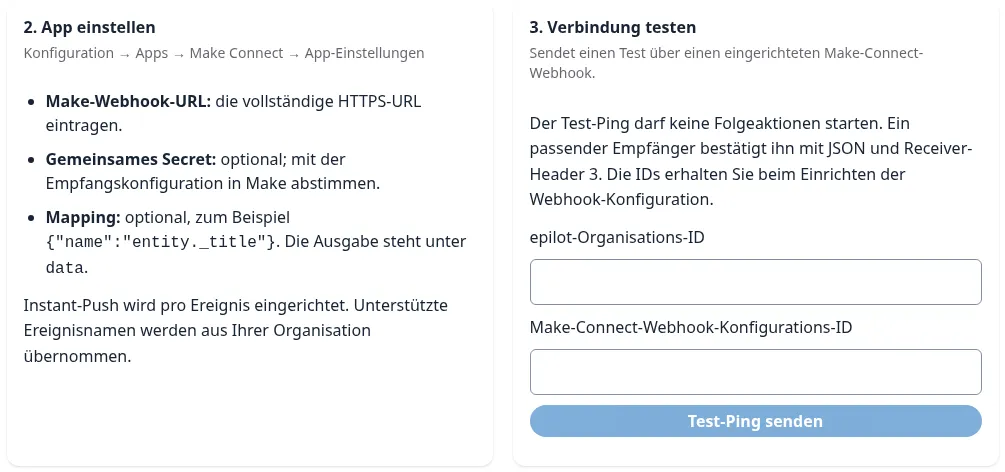
- In Make, use the module “Watch Events” as the trigger and create a webhook. Set a shared secret while doing so. It is optional but recommended. Copy the webhook URL.
- In epilot, open „Konfiguration“ (configuration), „Apps“, „Make Connect“ and there the app settings. Enter the webhook URL under „Make-Webhook-URL“ and the same secret under „Gemeinsames Secret“ (shared secret). Only HTTPS addresses of Make are allowed.
- Which events go to Make is defined per event as a webhook configuration in epilot, for example new or changed contacts, contracts or opportunities. The event names come from your organization. Currently I create these configurations with a tool during setup, disabled at first, and enable them after a test. Choosing events directly on the setup page is planned for a later version.
- Make the scenario in Make ready to receive, for example with “Run once”. In epilot, open the page “Make Connect”, enter the organization ID and the ID of the webhook configuration and click „Test-Ping senden“ (send test ping).
- Make answers the test directly without starting the scenario. The page then reports that Make accepted the test. This confirms receipt, not any follow-up actions.
- Then trigger a real event with a test record, for example a new test contact, and check the receipt in the scenario history.
6. Start a Make scenario from an epilot workflow
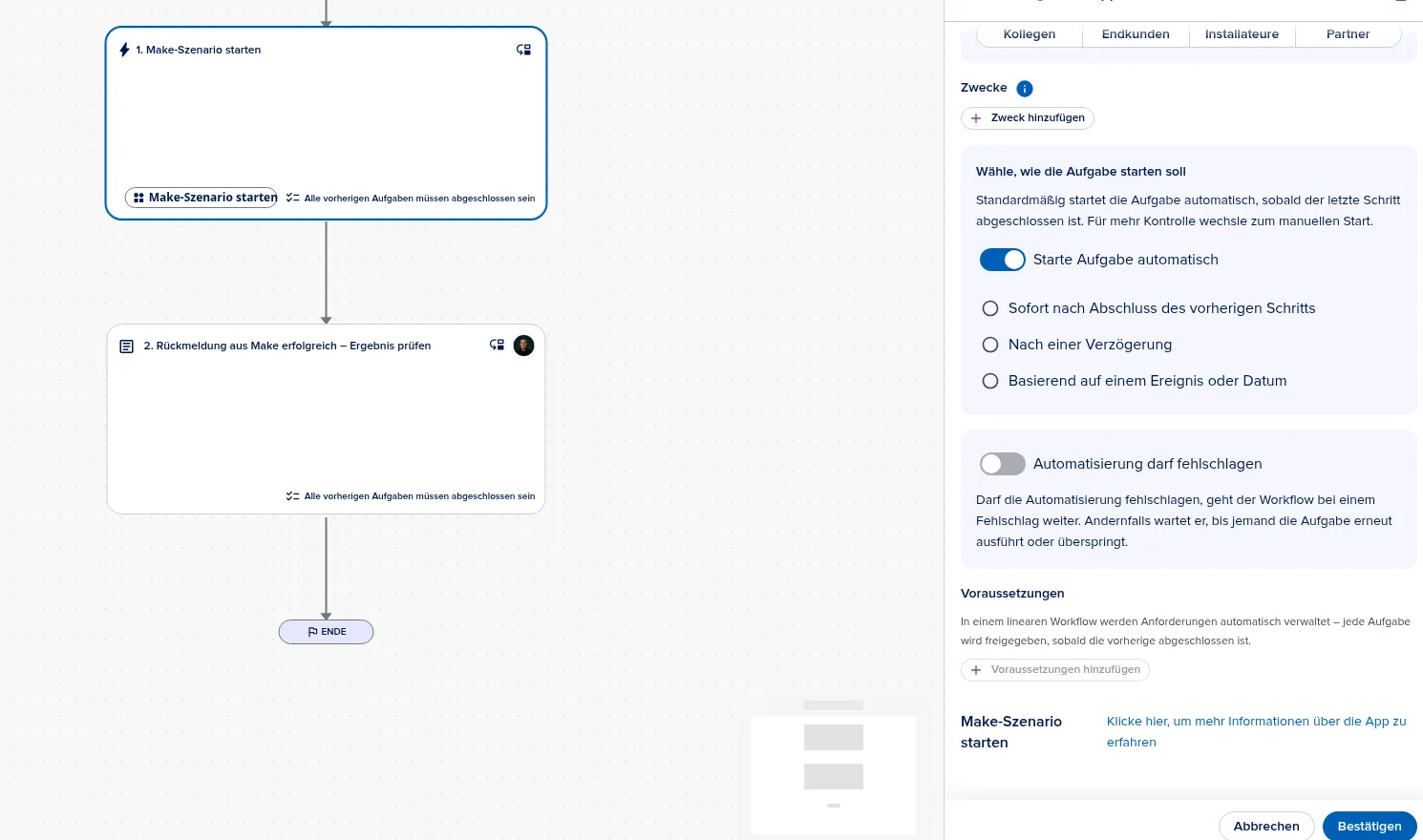
- In your epilot workflow, add the action „Make-Szenario starten“ (start Make scenario) at the point where it is needed.
- The action sends the workflow's record to the webhook URL from the app settings. So this webhook decides which scenario runs. With the optional payload mapping you pass additional single fields, for example {"name":"entity._title"}. They appear in Make under data.
- The workflow waits at this point. Make receives an event of type flow.triggered with the field callback.resume_token.
- In the scenario, first write the result to epilot with the record modules, for example with “Update a Record” or “Create a Note”.
- As the last module, add “Resume a Flow” and pass callback.resume_token. epilot then continues the workflow with its next step.
- Test status: sending from epilot to Make and determining the callback are proven live. The complete run up to the continuation of the workflow will be accepted before the release.
7. Import and adapt a template in Make
- Create a new scenario in Make, open the menu “…”, choose “Import Blueprint” and then the template file.
- Select your connection in every epilot module.
- Adapt record type, filters and fields. Custom attributes of your organization appear as fields once the record type is selected.
- The template “Kundenportal-Lead” (customer portal lead) is a draft. Before using it, add a filter on the lead event and a check for duplicate deliveries, otherwise duplicate leads can be created.
- Only activate the scenario after it ran without errors on test data.
8. Test and find errors
- Test with your own test records, not with customer data, and delete the test data afterwards.
- Make shows errors of single modules in the scenario history, with the module where the scenario stopped.
- Deliveries from epilot appear in epilot's webhook log.
- Typical messages, their causes and fixes are listed in the table further down.
Which settings does Make Connect have?
The settings are in epilot in the app settings of Make Connect.
| Key | Label in epilot | Meaning |
|---|---|---|
make_webhook_url | Make-Webhook-URL | Required. Full HTTPS URL of the webhook from Make, for example under hook.eu1.make.com. Credentials, ports and parameters in the URL are not allowed. |
shared_secret | Gemeinsames Secret (Header X-Make-Connect-Secret) | Optional, recommended. Sent in the header X-Make-Connect-Secret. Make checks the value if the same secret is set in the webhook. |
mapping_json | Payload-Mapping (JSON) | Optional. Maps output fields to paths in the event, for example {"name":"entity._title"}. The values appear in Make under data. Event data and callback stay unchanged. |
What does each part do?
The Make app also works on its own. Make Connect adds real time and workflows.
| Make app “epilot” | epilot app Make Connect | |
|---|---|---|
| Installed in | Your Make organization | Your epilot organization |
| Price | Free | €499 net per year, subscription via the epilot Marketplace |
| Detect new data | Polling at fixed intervals with Watch Records | Immediately through epilot webhooks and Watch Events |
| Start a scenario from an epilot workflow | Not possible | With the action „Make-Szenario starten“ and feedback to the workflow |
| Access | epilot access token in the Make connection | Webhook URL and optional secret, no token, no licence key |
With Watch Records, Make detects new and changed records at the interval the scenario is scheduled at. With Make Connect, the scenario starts as soon as epilot reports the event.
Make is a trademark of the Celonis group. Make Connect and the Make app “epilot” are offers of DigitalFreedom Global LLC and come neither from Make nor from epilot GmbH.
What arrives in Make?
Every event reaches Make as JSON in format version 1. This is a start from a workflow, values shortened:
{
  "version": "1",
  "id": "…",
  "type": "flow.triggered",
  "occurred_at": "…",
  "org_id": "…",
  "schema": "contact",
  "entity_id": "…",
  "entity": {
    "_id": "…",
    "_schema": "contact",
    "_title": "…"
  },
  "data": {
    "name": "…"
  },
  "context": {},
  "callback": {
    "resume_token": "…"
  }
}- type is entity.created, entity.updated, flow.triggered or connection.test. Native epilot webhooks are mapped to the same format and carry the type epilot.webhook.
- id is used to detect duplicate deliveries. epilot repeats a delivery if no acknowledgement arrives.
- entity contains the record, data the fields from the payload mapping, context business context only. Tokens and app settings are never sent.
- callback only exists for flow.triggered.
Make answers a test ping of type connection.test immediately, without starting the scenario:
{
  "ok": true,
  "type": "connection.test"
}
How does the workflow continue?
The module “Resume a Flow” only sends the resume token to the public endpoint of epilot's automation:
{
  "resume_token": "…"
}
The endpoint is POST https://automation.sls.epilot.io/v1/automation/public/executions:resume. epilot does not accept a result object there, so the scenario writes its results with the record modules first. Make acknowledges other events with {"accepted":true,"id":…}. This only confirms receipt, it is not a result of the scenario.
What about security and data protection?
Make Connect has no server of its own. The workflow action runs in epilot, events go directly from epilot to your Make webhook.
- The epilot access token is stored only in your Make connection. Make Connect stores no token and sends neither tokens nor app settings to Make.
- Webhook URL and secret are stored in epilot as secret settings. Only HTTPS addresses of Make are allowed.
- If a secret is set, Make rejects requests without a matching X-Make-Connect-Secret header and does not start the scenario. The header does not replace a signature and does not protect against replaying intercepted requests. Treat secret and webhook URL like a password.
- “Resume a Flow” sends no epilot token, only the resume token of the execution. It is confidential, and the Make app masks it in Make's logs.
- The permission automation:view allows reading the automations of your organization in principle. Make Connect uses it only to read the execution currently running.
- Events contain customer data from epilot, which is then also processed at Make. Limit events and fields to what is needed and include Make in your data protection documentation.
Data protection with Make
With Make Connect, Make processes data from your epilot organization. The following statements come from Make's documents linked below.
- Hosting: Make runs its cloud service on Amazon Web Services. According to Make's list of sub-processors, the customer selects the location: United States, Ireland or, for enterprise customers, Germany.
- Data zone: for organizations in the data zones EU1 and EU2, Make states processing in the EU. Make also points out that this does not apply to every request.
- United States: regardless of the data zone, Make processes some features in the US, including the AI assistant Maia, Make AI Web Search, the OpenAI models in Make's AI Provider and two modules of the AI Content Extractor. According to the list of sub-processors, some auxiliary services, for example for onboarding and user communication, are hosted in the US as well.
- Data processing agreement: Make provides a data processing agreement under Art. 28 GDPR, the Celonis Data Processing Agreement for Make. For customers in the EEA contracting with Celonis, Inc., it names the EU-US Data Privacy Framework as the basis for transfers, with the European Commission's Standard Contractual Clauses as the fallback.
- Audit reports: Make states completed SOC 2 Type II and SOC 3 audits.
- Make Connect itself has no server of its own and stores no event data. Events go directly from epilot to your Make webhook; access tokens and app settings are not transmitted.
- Your responsibility: GDPR-compliant use is up to you as the controller. This includes the data zone EU1, the data processing agreement with Make, the legal basis, the entry in your record of processing activities and data minimization in scenarios and logs.
Sources at Make:
- Make: Security
- Make: list of sub-processors (effective 20 February 2024)
- Celonis Data Processing Agreement for Make
- Make Help Center: AI providers and data zones in Make
What if nothing arrives?
Most errors show in Make's answer, on the page “Make Connect” or in the scenario history. The setup page messages are in German; English translations are given in brackets.
| Message | Cause | Fix |
|---|---|---|
| HTTP 401 from Make | The secret is missing or differs from the secret in the Make webhook. | Enter the same value in Make and in the app settings. |
| „Test abgelehnt (HTTP …)“ (test rejected) | The sign-in has expired, the ID of the webhook configuration is wrong or the permission webhook:create is missing. | Reopen the page in epilot, check organization ID and webhook ID. |
| „Die Webhook-Zustellung wurde nicht bestätigt.“ (delivery not confirmed) | Make did not accept the test, for example because of a wrong URL or because the scenario is not ready to receive. | Check the URL in the app settings, make the scenario ready to receive, look at the details in epilot's webhook log. |
| The action „Make-Szenario starten“ fails. | The execution context is missing or does not match. The action then sends nothing to Make. | Start the workflow again. If the error repeats, get in touch with the time and the workflow. |
| The workflow step stays in progress. | “Resume a Flow” was not reached, for example because a module before it failed. | Look at the failed module in the scenario history and fix the cause. |
| A file download ends with HTTP 403. | The file name contains one of the characters + ( ) ! ' or *. | Name the file without these characters. |
Further reading
Frequently asked questions about Make Connect
- When will Make Connect be available?
- Make Connect and the Make app are in development and being tested. There is no date yet. If you are interested, get in touch.
- What does Make Connect cost?
- Make Connect costs €499 net per year per epilot organization, as a subscription via the epilot Marketplace. The Make app “epilot” is free. Your Make account is subject to Make's own terms.
- Do I need both parts?
- No. The Make app alone is enough for scenarios that read and write data in epilot and poll new records at fixed intervals. You need Make Connect for real-time events and to start scenarios from epilot workflows.
- Which data does Make receive?
- The event with the affected record and the fields from your payload mapping. Access tokens and app settings are not sent to Make.
- Can I use custom fields?
- Yes. The modules load the fields live from your epilot schemas, including custom attributes. Relations, amounts and other special types are set through the field “Additional fields (JSON)” or the relation modules.
Interested in Make Connect?
Make Connect is not available yet. In a free 30-minute introductory call on Microsoft Teams we clarify which processes you want to connect with Make and whether Make Connect fits.